
OSFMount is a useful Windows utility designed for mounting disk image files as virtual drives. It allows users to access the contents of disk images without writing them to physical storage, making it helpful for forensic analysis, system recovery, software testing, and everyday file management.
Understanding which disk image formats OSFMount supports is important before working with an image file. Different formats store data in different ways, and compatibility can affect whether an image mounts correctly and how its contents can be accessed.
What Is OSFMount?
OSFMount is a Windows-based disk image mounting tool developed by PassMark Software. It creates virtual disks from disk image files, allowing Windows to treat the mounted image similarly to a physical drive.
Read More: How do I mount a disk image using OSFMount?
Users can mount an entire image or, depending on the image structure, access individual partitions. OSFMount can also mount images as read-only, which is particularly useful when the original evidence or source image must remain unchanged.
Which Disk Image Formats Does OSFMount Support?
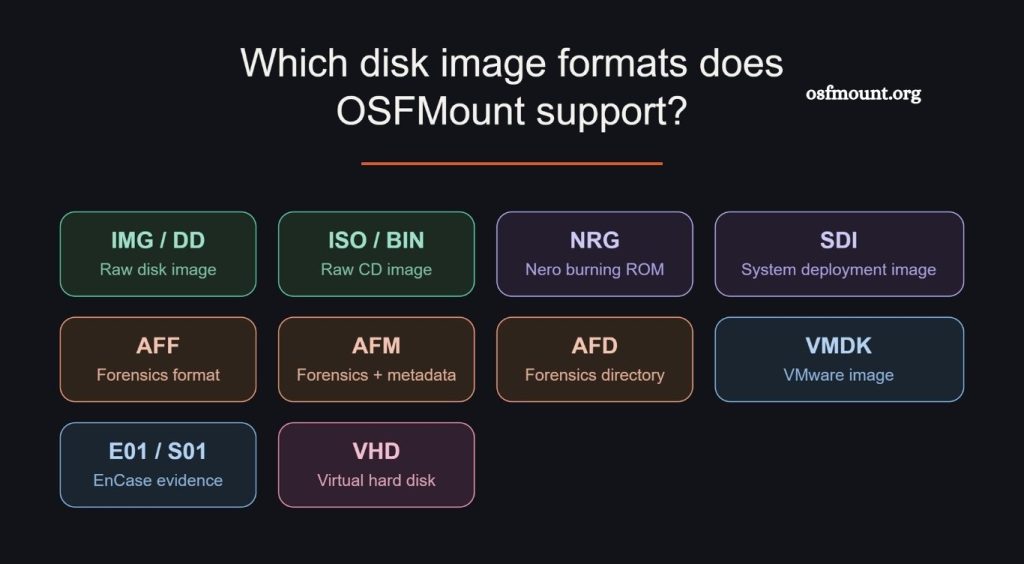
OSFMount supports several common disk image formats. Its compatibility makes it suitable for working with forensic images, backups, virtual disks, and raw disk images.
Commonly supported formats include RAW/DD, ISO, IMG, AFF, E01, S01, and VMDK, depending on the specific OSFMount version and image characteristics.
RAW and DD Images
RAW or DD images contain a sector-by-sector copy of storage media. These formats are widely used in digital forensics because they preserve the source data in a straightforward structure.
OSFMount can mount supported RAW and DD images as virtual drives, allowing users to inspect files without modifying the original image.
ISO Images
ISO is one of the most familiar optical disc image formats. ISO files commonly contain complete copies of CDs, DVDs, or other optical media.
OSFMount can mount compatible ISO images as virtual drives. This makes it possible to access files stored inside an ISO without burning the image to a physical disc.
IMG Files
IMG is a generic disk image extension used by various imaging applications. The actual structure of an IMG file can vary, so compatibility depends on how the image was created.
When the IMG file uses a supported disk image structure, OSFMount can mount it as a virtual disk.
AFF Images
AFF, or Advanced Forensic Format, is designed for digital forensic imaging. It can store forensic data together with metadata, making it useful during investigations.
OSFMount’s support for compatible forensic image formats makes it useful for investigators who need to examine disk evidence without directly modifying the source material.
E01 Images
E01 is a common forensic image format associated with EnCase-style imaging. Unlike a simple raw image, E01 can contain metadata and compression.
OSFMount can work with supported E01 forensic images, giving investigators another way to access forensic evidence as a virtual disk.
S01 Images
S01 is another forensic image format encountered in digital investigations. It can represent segmented forensic image data.
Compatibility with supported S01 images allows forensic professionals to work with certain evidence sets without first converting them into another format.
VMDK Images
VMDK is commonly associated with VMware virtual machines. These files represent virtual hard disks and can contain operating system files, applications, and user data.
OSFMount can provide access to supported VMDK images by mounting them as virtual drives in Windows.
Why Disk Image Format Compatibility Matters
Disk image compatibility determines whether OSFMount can recognize and mount an image successfully. A file extension alone does not always reveal the complete internal structure of an image.
For example, two files might both use the .img extension while containing data created by different imaging tools. One may work correctly with OSFMount, while another may require conversion or a different mounting application.
Checking the image format before attempting to mount it can save time and prevent unnecessary troubleshooting.
Read-Only Mounting for Safer Analysis
One of OSFMount’s useful features is the ability to mount images in read-only mode. This option is valuable when analyzing forensic evidence or an important backup.
Read-only access helps prevent accidental changes to the mounted image. Investigators can inspect files, folders, partitions, and other data while reducing the risk of altering the original evidence.
For forensic work, however, OSFMount should be used as part of a proper evidence-handling process. Maintaining verified copies, hashes, documentation, and chain-of-custody procedures remains important.
Can OSFMount Mount Encrypted Disk Images?
Disk image mounting and encryption support are separate issues. OSFMount may recognize the underlying image format, but that does not necessarily mean it can automatically decrypt every encrypted image.
If an image contains encrypted data, access can depend on the encryption technology, operating system, filesystem, and available credentials or keys.
Users should therefore distinguish between image-format compatibility and ability to access encrypted contents.
What If OSFMount Cannot Mount an Image?
If OSFMount fails to mount an image, the problem may not always be the file format. The image could be damaged, incomplete, encrypted, partitioned in an unusual way, or created using a format or feature unsupported by the installed version.
Start by identifying the image type and checking whether the file opens correctly with the software that created it. Updating OSFMount can also help when newer releases provide compatibility improvements.
For forensic images, avoid modifying or converting the original evidence. Work from a verified copy whenever possible.
OSFMount for Forensic and Technical Work
OSFMount is especially useful when disk images need to be inspected without restoring them to physical storage. Forensic analysts can examine evidence, while system administrators can inspect backups or virtual disks.
Its virtual-drive approach also makes file access more convenient because Windows applications can interact with supported mounted images in a familiar environment.
Conclusion
OSFMount supports a range of disk image formats, including commonly encountered RAW/DD, ISO, IMG, AFF, E01, S01, and VMDK formats. Support can vary according to the image structure and OSFMount version, so checking compatibility before starting important work is recommended.
Pingback: Can OSFMount create a RAM drive? - osfmount